Encryption is the technique of converting data from plaintext (unencrypted) to ciphertext (encrypted), an unreadable format, in order to prevent unauthorized access. Encrypted information cannot be accessed without using an encryption key or password. Encryption provides a fortified layer of protection just in case unauthorized access is somehow granted to a computer network or storage device. In this event, even a hacker cannot gain access to the data. With the rise of hardware-backed encryption, standards like NIST 800-88 or IEEE 2883:2022 recommend using Cryptographic Erase on encrypted drives to ensure complete media sanitization.
Types of Encryptions: Software vs. Hardware
Data can be encrypted on the drives via software or hardware-based encryption. A software encryption program is used to encrypt data on a storage drive by creating a unique key and storing it in the computer memory. This software-generated key is encrypted with a passphrase, which the user needs to get access to the encrypted data. When data is written to the drive, it is encrypted using the key and is decrypted by the same key before it is presented to the program/user. Software encryption can be done by using native operating system encryption, like Windows BitLocker, or other software utilities like LastPass, VeraCrypt, DiskCryptor, etc.
Most modern encryption tools now integrate with TPM 2.0 or Secure Enclave chips, making the encryption keys tamper-resistant and ensuring automatic locking in case of physical compromise. BitLocker, for instance, often leverages TPM to securely store encryption keys and lock access if unauthorized changes are detected.
Sometimes, the drive comes with built-in encryption features provided by the manufacturer, such as self-encrypting drives (SEDs). This is referred to as hardware-based encryption. An SED can be an HDD or an SSD that automatically encrypts and decrypts data as it is written or read by the user. The SEDs create random data encryption keys (DEK) through an onboard AES encryption chip, which encrypts the data when it is written and decrypts the data when it is being read. Unlike software-based encryption, SEDs automatically encrypt the data without the need for any user input for encryption. SEDs enhance security by operating independently of the OS and making unauthorized access relatively harder, though, like any other technology, they are not immune to vulnerabilities.
While software-based encryption and hardware-encrypted drives provide strong protection, simply relying on encryption is not enough when reselling or repurposing a drive. If the encryption key is not securely erased or removed using a software-based method, there will always be a risk of misuse of data. Further, for compliance purposes, standards such as ISO 27001 require verifiable erasure reports for drives that are repurposed, reallocated, or resold, irrespective of whether the drive uses encryption. Therefore, wiping encrypted drives is essential for eliminating the risk of unauthorized recovery and maintaining compliance with data security mandates.
Wipe Encrypted Drives to Make Them Reusable
To completely wipe encrypted drives, whether using software-based or hardware-based encryption, it is recommended to use a certified media sanitization tool such as BitRaser, which renders the drive reusable as a fresh storage device. BitRaser ensures the complete eradication of data, including the operating system, and follows up with verification to confirm that all addressable locations on the drive have been securely wiped.
- In software-encrypted drives, the software applies techniques such as Purge (Overwriting) or issues the Secure Erase commands to permanently erase all encrypted data at the disk level. For step-by-step guidance, refer to our article on wiping BitLocker-encrypted drives using BitRaser.
- For SEDs, data sanitization is achieved by destroying the cryptographic or Media Encryption Keys (MEK). Once the MEK is erased, the data stored on the device becomes inaccessible and effectively unrecoverable, even though the encrypted data physically remains on the storage media. This process, known as Cryptographic Erasure, is one of the fastest and most efficient techniques for sanitizing encrypted drives. To learn more, refer to our KB article on erasing self-encrypting drives.
Note: In cases where the hard drive is locked with a password, the BIOS password needs to be unlocked before accessing the drive to perform erasure. Additionally, drives protected with TCG Opal encryption or hardware encryption may require the correct pre-boot authentication to enable overwriting.
While cryptographic erasure is highly effective when implemented correctly, improper key management, firmware flaws, or user errors can still pose risks, which is why combining it with software-based overwriting methods offers added assurance.
BitRaser supports 26 international standards, such as NIST 800-88 Clear & Purge and IEEE 2883 Clear & Purge, which help erase data stored on encrypted drives. Here’s how BitRaser helps wipe an encrypted drive using the Drive Eraser software:
- Download the BitRaser Drive Eraser ISO from the cloud console portal post-purchase.
- Create a bootable USB using Rufus (a free utility).
- Connect the bootable USB to the system containing the encrypted drive and boot.
- Once the software main screen appears, connect the application to the Internet.
- Enter the login credentials of the BitRaser Cloud Console to fetch erasure licenses.
- Select the encrypted drive to be wiped.
- Choose an erasure standard such as NIST 800-88 Purge or IEEE 2883 Purge. (Enter the PSID or decryption key if the drive is locked to allow wiping)
- Click 'Erase' to begin sanitization of media.
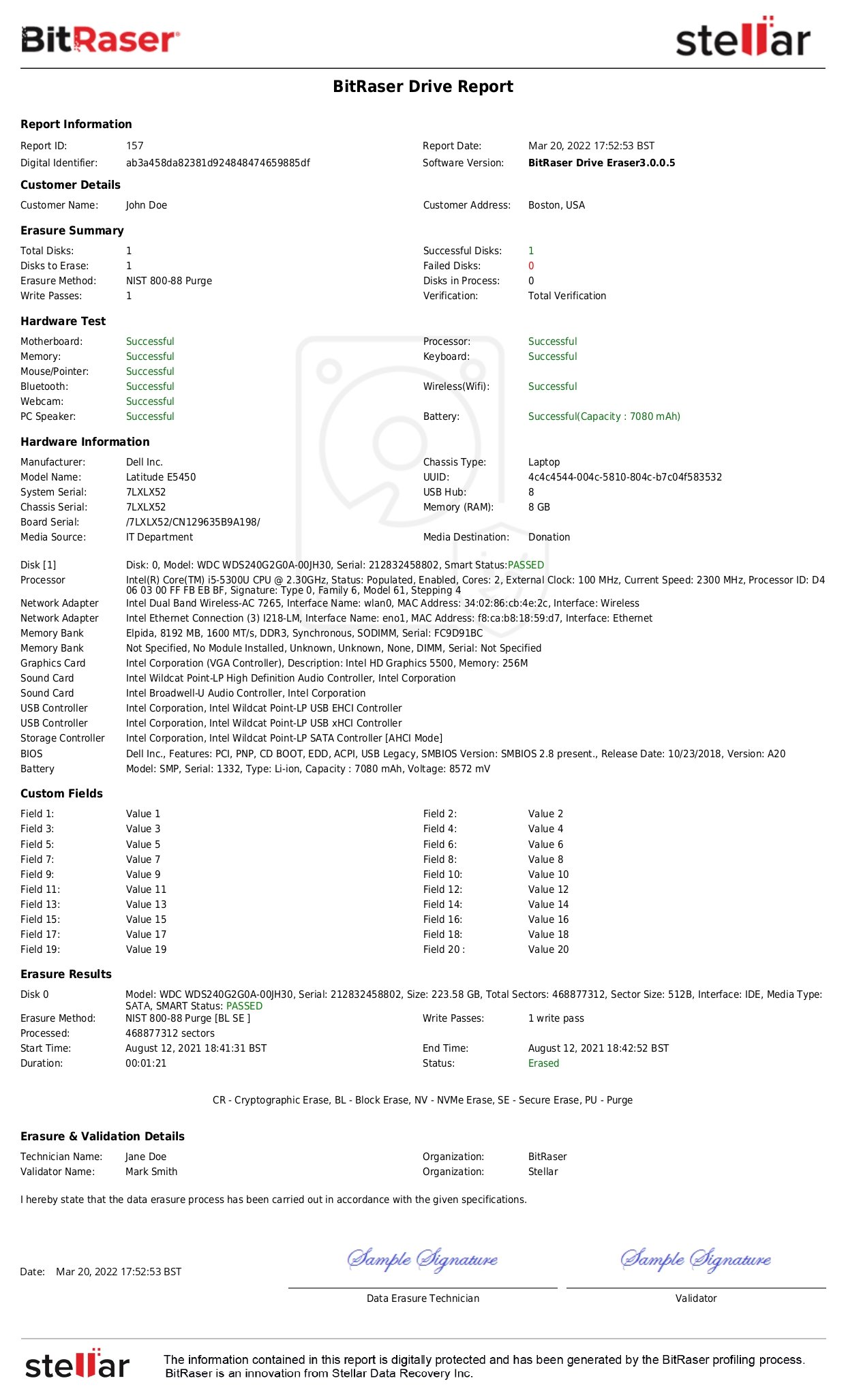
Once completed, an erasure report is generated that includes the encryption type and data erasure status.
See BitRaser Report
Final Thoughts
At a time when data breaches are in the news everywhere, businesses are aligning their data protection and data security strategies to protect their invaluable data through the use of encrypted devices. Encryption of data and the SED technology both provide a layer of security that prevents unauthorized access to confidential data. Organizations should ensure that these encrypted devices, when disposed of, reallocated, or repurposed, are permanently sanitized using the right data destruction software that promotes reuse and the circular economy. BitRaser is an ideal choice for organizations looking to wipe an encrypted drive.







 +1-844-775-0101